Table of Contents
Orbit Core Desktop 11.1
This is the homepage for all documentation about Orbit GT's core desktop solution Orbit GIS both standalone and client-server.
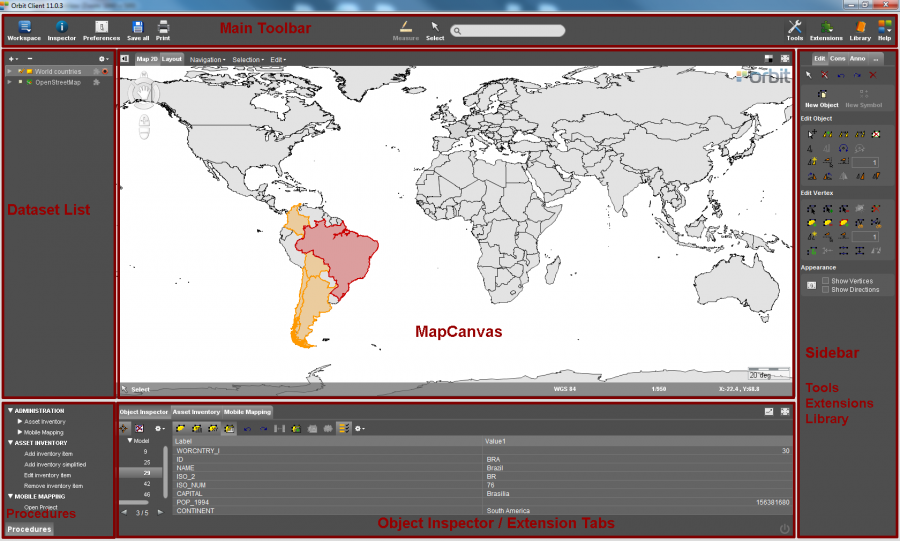
| Main Toolbar | |
|---|---|
| Main Toolbar | Homepage of all main toolbar functions, tools and menus. |
| Inspector | Open the Object Inspector to get all information about the selected objects. |
| Preferences | Open the preferences window. Preferences are user settings, define how you would like to use Orbit. |
| Measure | Make measurements : Map 2D Measurements, Map 3D Measurements. |
| Select | Select vector objects : Map 2D Select Objects, Map 3D Select Functions. |
| Search | Search objects based on a single attribute query in all visible layers. |
| Tools | Sidebar to all Orbit's standard tools for spatial editing, constructions, annotations and other tools. |
| Library | Find and add any supported resource to the current workspace. |
| Dataset List & Datasets | |
|---|---|
| Datasets & Dataset Lists | Homepage for all information about the Dataset List and its including Datasets : open, import, create and remove datasets. |
| Dataset Operations | Set dataset visibility, Activate dataset, Record dataset, Save dataset edits, Cancel loading dataset, Arrange dataset. |
| Dataset Context Menu | Right click the dataset in the dataset list to get access to all dataset related settings and properties. |
| Dataset Properties | View the dataset information and attribute component, edit the dataset structure, link the dataset to external tables and change the presentation of the active dataset. |
| Dataset Legend Editor | Edit the legend and presentation of the dataset objects, display attribute values as labels or charts. |
| Dataset Attribute Table View | Display the dataset attribute table. |
| MapCanvas | |
|---|---|
| MapCanvas | Homepage for Map 2D, Map 3D and Print Layout. |
| Map 2D Navigate functions | Compass rose, pan, zoom and rotate functions on Map 2D. |
| Map 2D Measurements | Measure lines, circles, perpendicular distances and angles on Map 2D. |
| Map 2D Menus | Navigation, Selection (find and query objects) and Edit menu on Map 2D. |
| Map 3D Navigation functions | Compass rose, pan, zoom and rotate functions on Map 3D. |
| Map 3D Measurements | Measure points, lines, area and rectangular volumes on Map 3D. |
| Layout | Print layout view. Must only be used to prepare and to make your map Print. |
| Map 2D Tools | |
|---|---|
| Map 2D Tools Overview | Homepage for Map 2D edit, construction, annotation and other tools. |
| Edit tools | Tools to create and edit vector data using the edit sidebar. |
| Construction tools | Tools to add constructions using the constructions sidebar to assist high accurate vector editing. |
| Annotation tools | Tools for annotation and redlining available via the annotation sidebar. Quickly add and exchange some remarks on the Map 2D. |
| Additional tools (…) | Convert Imagery, Make Multiresolution Image, Create Buffer, Georeference Image and Vector, Make Symbol Library Image, Make Legend Display Image, Optimize Point Cloud, Convert Point Cloud |
| Map 3D Tools | |
|---|---|
| Map 3D Tools Overview | Homepage for the Orbit 3D tools for point cloud processing, selection and editing.. |
| Point Cloud Tools Sidebar | Tools to edit presentation, select, export and delete point cloud data. |
| Additional tools (…) | Optimize Point Cloud, Convert Point Cloud |
| Tabs & Inspectors | |
|---|---|
| Object Inspector | The Object Inspector provides detailed insight in the properties of the selected objects in the MapCanvas |
| Asset Inventory | Extension tab of Orbit Mobile Mapping Asset Inventory. |
| Mobile Mapping | Extension tab of Orbit Mobile Mapping. |
| Obliques | Extension tab of Orbit Obliques. |
| Stereo | Extension tab of Orbit UAS Mapping. |
| Print and Export | |
|---|---|
| Print and Export | Print the map, Export datasets or selected objects and other Orbit export possibilities. |
| Installation and Licenses | |
|---|---|
| Hardware & OS | Hardware, technical requirements and operating system related documentation. |
| Desktop Install & License | Download and install Orbit, Request and activate your license. |
| Orbit License Restrictions | Overview of Trial and Demonstrator license restrictions. |
| Raise Memory | Get more Orbit out your powerful machine. Raise the amount of memory (RAM) that can be used by an Orbit 64bit installation. |
| Log files and Troubleshooting | Generate and sent log files. |
Latest Update Orbit GIS
Orbit Core desktop framework Update 11.0 - June 2014