Table of Contents
Dataset Structure Contents
The Dataset Structure Contents panel gives access to the internal structure of the selected dataset.

Right-Click on the dataset in the Datasets & Dataset Lists > Dataset Context Menu > Dataset Properties > Contents
|
|
A dataset can have one ore more Models, a model can have one or more Attribute sets, an attribute set will have one or more Attributes. It is strongly recommended to read first
|
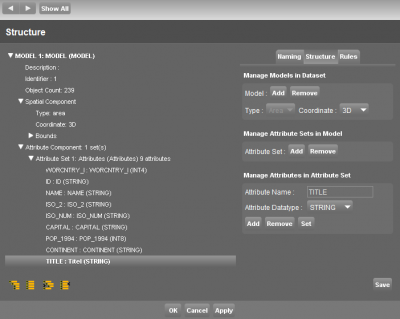
Dataset Structure Content
| Left Side | Overview of the Spatial and Attribute Component. |
|---|---|
| Model Structure | General information about the dataset structure for each model. |
| Right Side | Tabs to manage and edit the Dataset Structure and Attribute Component. |
|---|---|
| Naming | Rename Models, Attribute Sets and Attributes. Define special Attribute information such as hyperlinks, annotation attributes, a map tip and primary field. |
| Structure | Add and Remove Models, Attribute Sets and Attributes. Manage the Spatial Component of Models : Point, Lines or Areas and 2D or 3D. |
| Rules | Add a Valuelist or a Formula to an Attribute. |
Table Join
- Table Join: Link an external table or database to the dataset.