Table of Contents
FME Resources
Orbit supports read access to all resources supported by the “FME Objects” library from Safe Software (*.dxf, *.dwg, *.dgn, …).
The Orbit resource driver to support the FME library is included in any Orbit installation. No additional Orbit purchase. FME has to be purchased separately :
Install and Configure FME
- Install FME (32-bit only)
FME must be installed on the the same computer where Orbit is running.
- Copy FME Objects library
Copy the fmeobjects.jar file from your FME installation directory (../FME/fmeobjects/java) to the Orbit installation directory- Orbit 10.4 or more recent versions : <Orbit installation directory>\software\<version>\lib_generic\jar\
- Orbit 10.3 or previous versions : <Orbit installation directory>\software\driver_fme\<version date>\jar\
- Add the following line to <Orbit installation directory>\program\config\orbitgis.ini :
acad-fme.driver.format.name REALDWG
Notes
- If you are running Orbit in 64-bit also FME must run 64-bit.
- Do not keep multiple FME installations on one device. Uninstall the previous installation and copy the fmeobjects.jar again after finishing the new installation.
Use in Orbit
Any by FME supported resource can be used (read only) like other supported resources.
Layout Component : Legend and Labeling
When opening a FME vector resource in Orbit the original object color will be retained. A direct color classification will be applied on the received object color code. Pay attention for possible white colored objects, change the map backdrop color if required.
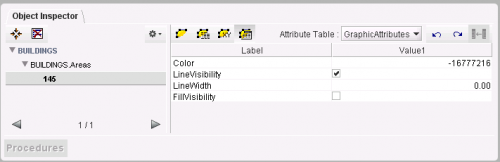 The FME color code and other FME legend parameters are listed as attributes in the object GraphicAttributes table.
The object color can be changed by adjusting this color code in the Object Inspector or by creating a new Orbit legend via the dataset Legend Editor.
The FME color code and other FME legend parameters are listed as attributes in the object GraphicAttributes table.
The object color can be changed by adjusting this color code in the Object Inspector or by creating a new Orbit legend via the dataset Legend Editor.
Spatial Component
When opening a FME vector resource in Orbit, the available layers will be split into different dataset models.
Each model can contain only one type of spatial objects (points, lines or areas).
A DWG or DXF layer can be split into 4 models : points, lines, areas and text. A text model are points with text labels.
More information about dataset models can be read here : Vector dataset structure concepts.
Each dataset can be exported to or saved as a native supported vector file for future editing, see Dataset Context Menu.
Note that a FME resources probably cannot be exported to one single Esri Shape file. A Shape file supports only one dataset model.
The use of an Orbit Vector File is advised for future editing.
Attribute Component
FME resources will have 2 or 3 attributes sets :
- Graphic Attributes : contains the visualization attributes of the objects (Color, Line Visibility, Line Width), review legend above.
- Format Attributes : contains the properties of CAD-layer like cad_layer, cad_entity, …
- Attributes : contains any other available attribute (not always available).