Table of Contents
Orbit Desktop Installation and License Request
Walk through these 4 steps to download, install, request license and activate your Orbit standalone desktop product.
Client-Server and Publisher products are available on demand only and will require assistance by the Orbit support team to install.
Download Orbit product
Download
Orbit's Standalone products are available for download for registered users from our website : www.orbitgt.com.
Register
To download a standalone product registration is required. Register and confirm your registration via the confirmation email. Your account can be used for future downloads and license requests : http://www.orbitgt.com/user/register.
Check your junk mail, the activation email may be blocked by your spam filter.
If you have a problem with registration or activation, contact support at orbitgt dot com.
Install Orbit product
Double click the downloaded executable to install.
Administrator privileges are required for a successful installation.
Points of attention
- Do not overwrite a previous Orbit installation with a new update.
- When installing an update of Mobile Mapping Asset Inventory you may wish to create a backup of your inventory themes first.
- Administrator privileges required to install and use Orbit MM products version 10.5.
Request your license
Orbit provides in a limited trial license. Only after purchase, a full permanent license can be granted.
To request a license you will need an account and login onto our website, see register above.
- Start Orbit
If you do not have a valid license, the license window will pop-up. - Orbit License Window
(1) Select the license type in the table column “Flag for Request” and (2) click “Request License” button in the top right-hand corner. (3) You will be redirected to the online license request page. - Online License Request page
You will need to login (registration required) and confirm your request. - License Mail
After confirmation you will receive an automatic reply to confirm your license request has sent successfully.
New license requests are processed during CET office hours (9AM - 5PM CET). As soon your request has been validated, you will receive another license mail containing the license key.
Orbit License Window 
|
Online License Request page 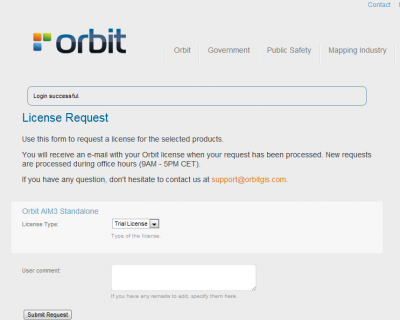
|
Activate your product
I have license
When you received your Orbit license key you are ready to activate your product :
- Start Orbit, the license window will pop-up if you do not have a valid license. Otherwise, Open from the Help menu.
- Select the product in the table view
- Copy and Past (Ctrl + v) the entire license string into the field “I have a License”.
- Click on “Validate” to check and activate the license.
- Restart Orbit.
If you would like to use Orbit standalone desktop products on the same hardware with multiple operating system user accounts you will need to repeat this process for each user.
I use a License Server
Only if you are using a local Orbit license server, the product can be activated via “I use a License Server”. Enter the license server's DNS or IP and port of the Orbit Enterprise Service, e.g. 10.125.1.69:1100
More Information
- Online documentation
Take a look at our comprehensive online knowledge base : Orbit Desktop Installation and License Request. - License Restrictions
Depending your license type some restrictions will be applied : Orbit License Restrictions. - More memory to run Orbit
Get more out of your powerful computer : Raise available Memory for Orbit. - Questions?
If you have any question please can contact our Support Team : support at orbitgt dot com.