This is documentation of an archived release.
For documentation on the current version, please check Knowledge Base.
For documentation on the current version, please check Knowledge Base.

DEM Settings

|
DEM Process
|
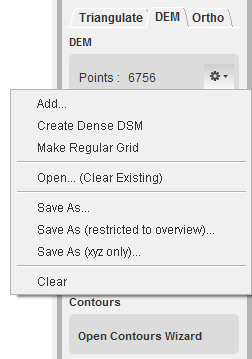
Add, open, save, clear DEM points
|
Create DEM points Import DEM points Export DEM points Remove DEM points
|
Create DTM
Auto-create dem points can be done in different ways:
- Manually: use the strabo selection and open the DEM module. Now you can manually add and delete DEM points in a certain grid. The grid distance is based on the values given in the strabo preference menu: process properties. The DEM functions (add/delete/next point) can be switched in the strabo preference menu: mouse settings


- Import: 'add' points in *.sdp, *. opc, or *.txt format
- Automated: create dense DSM and possibility to make a regular grid of these points (grid distance are given in the strabo preference menu: process properties.


Open, Save, Save, ... DTM


Last modified:: 2019/03/25 11:36