This is an old revision of the document!
Back to gps_photography
GPS Photography - Import Photos
The GPS Photography procedure “Import photos” allows the Orbit user to import new GPS photos.
Procedure
- Launch the procedure “Import photos”: 'Procedures' > 'GPS PHOTOGRAPHY' > 'Import photos'

- Import : import GPS photos
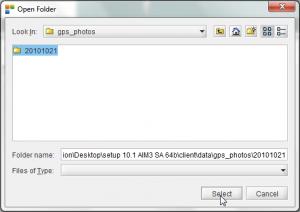
- Browse to the folder where your GPS photos are located by clicking the map icon.
If photos include a TAG, they are automatically assigned to the according type

- Select the according folder
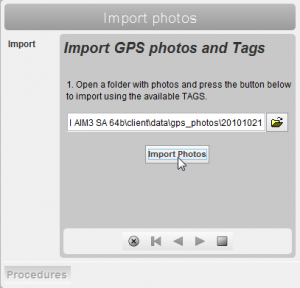
- Click the 'Import Photos' button
Depending on the image size and the number of photos this might take a couple of minutes.
- A popup window automatically opens when the import of gps photos has completed. It also shows some information about the import:
- the number of succesfully imported photos
- the number of photos in the folder that were imported previously
- the number of imported photos that didn't include a TAG. These are automatically assigned to the 'Default' type.

- Finish the procedure by clicking the square button.
Next action
In the GPS Photography tab it is possible to select, view , edit and inventory imported photos.
Last modified:: 2013/03/13 15:56