Table of Contents
Tiepoints... Dialog
Use this dialog for all accurate tiepoint measurements needed in the Aerial Triangulation process.
With this dialog you can also inspect the different tiepoints at any moment.
Selecting this menu from Strabo's View menu will show the next dialog:

The 'Tiepoint...' dialog displays:
- The actual list of the tiepoints.
- Number of Unique Points: this is the number of tiepoints.
Each tiepoint is expected to be measured in at least 2 images and gets the same name in the different images where it is measured in. - The total number of measurements.
- A flag whether to display the names of the tiepoints or not.
To view a tiepoint run through these steps:
After selecting a tiepoint in the list at the left side of the dialog, you can use the next different function buttons:
- Press the 'Show' button to reposition the OrbitGIS overview and place the requested tiepoint in the center of the overview.
- Press the 'Refresh' button, to update the list of tiepoints at the left side of the dialog.
- Press the 'Edit' Button to show the next dialog:

This dialog shows all existing measurements of the requested tiepoint in an extraction of the image.
Every image detail window refers to an image where you have measured the tiepoint.
In these windows you can investigate, add, delete or remeasure the tiepoint.- The following functions are available in every image detail window:
- Standard panning and zooming toolbar functions with identical behavior as in the OrbitGIS
- To delete a tiepoint measurement in an image follow the next steps:
- Click inside an image window using the right mouse button to get the following submenu:
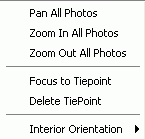
- Select the 'Delete Tiepoint' button to clear the measurements of that tiepoint in the selected window.
- To measure an image point follow the next steps:
- press the button
 .
. - Position the mouse pointer over the image detail of you choice being functional as tiepoint in the aerial triangulation process.
- Press the left mouse button to measure the tiepoint.
- To measure a fiducial mark using the
 button: see the Fiducial Marks chapter.
 - The popup menu as explained in point '2' above has more functions.
See chapter 'Measuring tiepoints' for further explanation.
- Press the 'Delete' button to delete all measurements of the selected tiepoint in all images at once.
For a more elaborate explanation about measuring tiepoints from scratch see chapter 'Measuring tiepoints'.