Table of Contents
What's New for 25.00.02
3DM Manage and Extract
Compare Point Cloud to Design
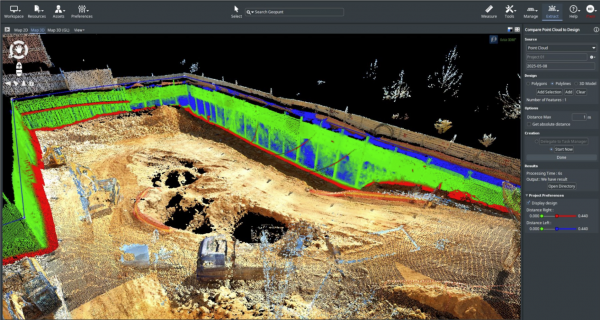 A new Tool Compare Point Cloud to Design, allowing to compare Vector Files or 3D Models against Point Cloud data.
- A slider has been added to adjust range distances.
- It is possible to have negative offsets.
- Point distance will be calculated to 2D line or polygon and to 3D Shape (3D tiles).
- Its possible to calculate point distance to 3D shape (3d tiles, obj format).

Convert Annotations to Features
- A new AI Extension 'Point Cloud Annotations to Objects' has now been created.
- Class Names are now kept when generating selections via the Point Cloud Classification to Selections tool.
- Its now possible to reuse classes when using the tool Point Cloud Selections to Classifications.
- The Ignore Classification in Convert Point Cloud sidebar now working as expected.
- It is now possible to hide vertices and centers of 2D Objects in Image Annotation Editor.
- Point Cloud Annotations to Objects now has user-defined settings when creating line, boxes, and polygons objects.
- A new checkbox in Mapping Extension Vector overlay has been added to only show an active Object.
- The 'Generate Objects from a classified source' option within the AI-Detection sidebar has been removed and now replaced with the Point Cloud Annotations to Objects extension.
- A Generate Object button now exists in the AI Detection sidebar to quickly move the the Point Cloud Annotations to Objects Sidebar.
Enable AI Evaluation Workflow
- New AI workflows require new and custom classifications files. As a result, development has prepared the following:
- A classification colors .ini file can now be used to have unique classifications at the reality data level.
- The classification colors .ini file (if present) will now upload to the cloud with reality data.
- A classification colors file type has also been updated to .json.
- The Create ContextScene' procedure was been reworked now as 'Create Annotations Checkpoints' and added within sidebars.
- The use of classification colors .ini file is now used (if present) when adjust resource data Classes in the Dataset Properties.
- Annotations Checkpoints can be reimported with the 'Manage Image Annotations' option.
Import & Improve Reality Data Interoperability
- Gaussian Splats SLY and PLZ are now enabled datatypes to upload to Reality Management.
- Subtabs within the iTwin catalog will now have label button and tooltip to help guide the user.
- The iTwin Catalog now sorts retrieved data in the default order determined by the API, not by name.
- Tables within the iTwin Catalog now sort with the same behavior as the Reality Management Portal.
- First Click: Ascending order
- Second Click: Descending order
- Third Click: No Sort order
- Within the iTwin Catalog Feature Class, a new column “Dimension” has been add and “Table Name” has been replaced with “Created”.
- A new sub tab 'Computing Jobs' in 'iTwin Catalog' is present, allowing for visibility on the Import, Analyze, and Conversion Service from the Reality Management Portal. Additionally, all operations of Reality Conversion Service, Reality Analysis Service, Reality Data Service have been tested.
- The Reality Data Collection datatypes have been revised to only the relevant types when uploading to Reality Management. This includes:
- Image Collection
- Orthophoto
- Orthophoto and DSM
- Scan collection
- Unstructured Data
Improve Vector Data for AI Workflows

- A new tool Create Point Cloud from Vector has been created.
- The compare Vector data tool now works with Multimodel Vector datasets.
- The compare Vector data tools also works with lines and areas.
- Objects can now be created on Point Cloud Selections within Asset Resources via Generate Data > Create Objects.
- The datatype FLOAT8 can now be used for certain fields when converting from ContextScene to a DataSet.
- Fixed a bug where a it was not possible to open a GeoJSON.
Keep Inputs for S3D Inference
- From AI Detection, 3D Segementations, a new added option 'Keep Input Resolution' is now available.
Upload and Manage AI-Detector Library
- The AI-Library can now read the detector capabilities from AI-Library Service. Details are displayed in the AI-Library sidebar.
- Labels and Exports can now be filled in when uploading new AI detector.
- There a column with the Display Name is available in the AI-Library and AI Sidebar. Additionally, this is editable when using using a local detector.
- Within the AI-Library, the My.Org AI-Detectors can have the Display Name, Description, and Doc URL edited.
- AI-Detectors can be searched by label and export format within the AI-Library.
Update AI-Detectors with AI-Library
- The AI-Library sidebar has been updated to provide more context on AI-Detectors and detectors metadata.
- The AI-Library sidebar will now provide version information on both local and cloud AI-Detectors.
- New AI-Detectors will now be automatically synced during upload.
- Fixed a bug where Version of Detectors would be deleted, and existing Versions were not synced to the AI-Library.
- AI Detection Preference panel has been updated to reflect options on the latest changes.
- AI Library has been updated and tested to reflect the updates from the Reality Analysis Service.
Usabilities with Linear Reference Systems
- Its now possible to create a vertical Slice View Perpendicular to a Linear Reference with 1 click.
Maintenance
- WFS and WMS passwords can now be Scramble and Unscrambled.
- Within a Mapping Run import, its now possible import via directory of point cloud data.
- A space separator is present in measurements with large values to better read the value.
- For faster navigation, the Open Next Photo and Open Previous Photo mnemonic can now be hold down again.
- The Legend Editor “Edit all Parameters' is now larger to allow more space between components.
- From the Local Catalog Sidebar, a message will now be showed instead of empty field for Additional Content if data exists.
- There is now a refresh dropdown list with Mapping Resources in procedure 'Create Snapshots'.
- When converting OPC to 3DTiles, the Intensity, RGB, Classification and Timestamps are now possible to include.
- The DataType Filter within the Upload sidebar is now reset after an upload to Reality Management.
- When a task is now set to Task Manager, the button is now activated to show an action and tasks are ready from the Task Manager.
- ODB resources being written in a Postgres database are now set with a SpatialType of “PostgresGeometry” to better store Postgres geometries.
- The results of Point Cloud Selection to Classification now has a display name with suffix “_classified”.
- For 2D Objects and 2D Segmentations, an undo action is now available within the Image Annotation Editor.
- An “Open Directory” button is now available the the 3DM Cloud sidebar.
- Uploading data to Reality Management is now more intuitive with better interactions from the Local Catalog.
- ODB resources can now be created in the Import & Upload tool.
- Updated and better feedback is now present to the user if Reality Data cannot be uploaded to Reality Management.
- Measurement Preferences to are now updated to reflect workspace units.
Bug Fixes
- Fixed a bug that did not allow removing of a vertex from a Refine Envelope.
- Fixed a bug where “Open Image View” from “3D View” would not work with Planar imagery.
- Fixed a bug where Edit All Parameters window is blank after choosing a symbol.
- Within the AI Detection sidebar, the option 'Generate objects from classified source' is now only present with classified point cloud data.
- Fixed a bug where AI Object 2D results cannot be imported into a Mapping Resource.
- All files with datatype '3MX' can upload to Reality Management.
- Fixed a bug where adding or removing existing 2D segmentations did not work.
- Fixed a bug in the Delivery procedure when merging multiple runs with option 'Create image sub directories' has a wrong target run.
- Fixed a bug when adding a fence to Delivery created an incorrect output CRS.
- Fixed a bug where a recourse envelope was not updating after “Update” in the Reality Management sidebar.
- Fixed a bug where Rutting Analysis fails for Path option.
- Fixed a bug where a box dataset exported from Image Annotations to Objects is not set as Type Box.
- Fixed a bug where partner desktop installations could not use the Analysis Engine.
- Fixed a bug where rotation is not applied when ContextScene to Objects.
- Fixed a bug where ContextScene with oriented images contains NaN values.
3DM Publisher
Add and Enhance Geocoding Service
- Support now exists to add Google Geocoding.
- It is now possible to hide the geocoding option from the Console.
Enhance Report a Problem Workflow
- A reports overview column is now added in the console to better manage and identify existing Publications with reports.
Implement Create and Verify Sidebar
- An Implement Create & Verify Sidebar now exist for ODB resources.
Resolve Feedback with AppSec Audit
- Fixed a bug where Organization statistics are restored in the CRM.
- The legacy FTP has been shutdown and moved to a SFTP.
- The licensing service has been moved to a support VM.
- The CRM app has been updated to a new server.
Maintenance
- All Minio storage jar files are now by default part of the installation.
- There is now an error banner for console users is an issue happens during a saving.
- Web Services PHP that were hardcoded in the source code have been removed, deleted, or moved into settings.
Bug Fixes
- Fixed a bug where the Navigation Guide links to incorrect page if the branding.json has custom links to knowledge base and navigation guide.
- Fixed a bug where images from Report a problem were not loading after a configuration reload.\
- Fixed a bug where the server could not be logged into being online for over 29 days.
- Fixed a bug with a missing permission Check on Access provider management operations.
3DM Viewer
Create and Verify Data

- A new Create and Verify Sidebar has been made, allowing for the efficient QA/QC from the Viewer and synergy with Desktop workflows.
Download from Viewer
- It is now possible to download the visible point cloud data as LAS from the 3D View and Slice View.
Enhance Photo Metadata
- Original Photos can now be downloaded.
- In the View state popup, its now possible to download all information within the Panel and the View State.
Improve Point Cloud Display

- The display of point cloud data has many more increments to adjust from small to large. This now minimizes the tiling differences between point cloud data in the foreground and background.
Improve Usabilty within Mobile Applications
- The zoom gesture functionality is now implemented on 2D and Spherical photos.
- There is now support for split screen touch support.
- A touch gesture is now possible to tap into Photo positions.
Improve User Experience

- A user-customized About panel can now be added will popup upon Publication startup.
Improve Linear Reference Capabilities
- Tooltips have been added when using the Search option with Linear Reference lines.
- A new Linear Reference View label is available in Image and Slice Views.
Search and Open Image
- Via a new endpoint, it is now possible to open direct original photo from the backend database.
- https://3dmapping.cloud/openphoto/?photoId=<runId>:<photoId>
- Implement search on startup is now possible with:
- x/y/z/crs or lat/lon: focus all views
- photoId:open photo on startup
- There is a new navigation button within in the Measure, Select, and Annotation Sidebar. This button allows for better optimization when switching between navigation, select or measure modes.
Maintenance
- The timeline will now always keep the selected time after timeline changes.
- collection times associated with Basemaps can now be used with timelines.
- Fixed an abbreviation of October within the Timeline.
- A “Browser” language option is now available within the Publication Specs and Viewer General Settings.
- Enable opening a photo from search can now be set from General > Search settings
- Enable pre-configured vector search is now possible.
- There is now improve View Sync from 3D View to 2D Reference View.
- There is added WFS support for returning a limited list of attributes.
- Error messages have been improved and simplified if the resources cannot be opened within the Viewer.
- The 3D View will no longer be displayed in EPSG:3395.
- The opened timeline data will now always stay in the same chronological order of a date Sequence.
- There is a new View Action Item “Show Open Resources”.
- There is newly added support for point cloud with resource classification colors.
Bug fixes
- Fixed a bug where a highlight object has a shift when if data are in the CRS 9300.
- Fixed a bug where a basemap was not positioned properly with the CRS 27700.
- Fixed a bug where the image View Synching to the last move-to position.
- Fixed a bug where Photo Positions will not appear in Reference or Image View.
- Fixed a bug where View sync was not working with two 3D views.
- Fixed a bug where OMI's could not be used as terrain.
- Fixed a bug where Basemap tiles not loading in 3D view.
- Fixed a bug where you were unable to open console after setting metadata value.
- Fixed a bug where Geojson lines and areas are saved with duplicate points.
- Fixed a bug where an OWFS fails to open when using an OAuth Login.
- Fixed a bug where the time filter was not taking entire time group into account.
- Fixed a bug where the time filter disappears when no more resources are in focus.
- Fixed a bug where the Up and Down Arrows had inverse navigation.
- Fixed a bug where the timeline would disappear within Resource Groups if no data was present within the View(s).
- Fixed a bug where the Reality data was distorted when a Zoom Extent was changed to 3395.
- Fixed a bug where the View Information components would disappear within Views.
- Fixed a bug where an object disappears from Slice View after Edit Geometry
- Fixed a bug where the Inspector Search will not populate values upon first load.
- Fixed a bug where the Measurement sidebar “Navigate” button would clear.
- Fixed a bug where the reference map would not display data.
- Fixed a bug where a 2D Linear Reference would not follow set Ground Height.