Table of Contents
What's New for 24.00.03
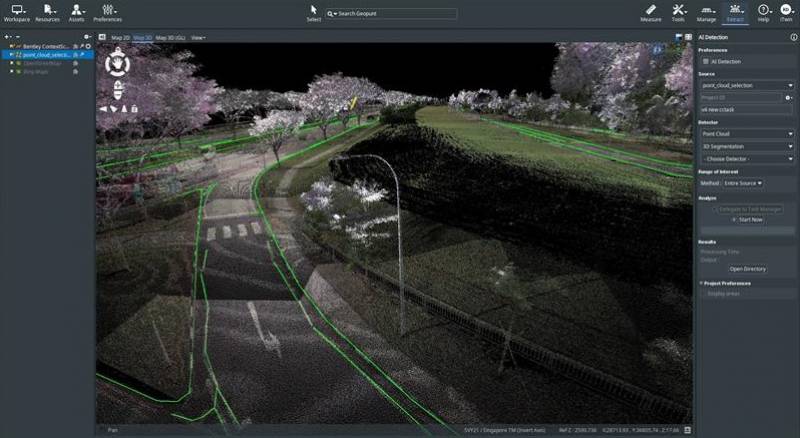
3DM Manage and Extract
Adding Special Coordinate Systems
- Support for Hs2 Vertical CRS 9303 has now been implemented.
- Support for a Local Tata Steel conversion from CRS: 29882 has now been implemented.
Annotate Reality Data for Linear Feature Detectors
Analyze Engine
- The Analysis Engine no longer is required to be started when running AI Detection. It will only be required to be installed on the working station.
Annotate Images for AI Training
- Extentions related to AI Training have been moved up in the extension levels:
- Image Annotation Editor and Image Annotation to Objects are at the highest Extraction level
- Local Catalog and Cloud Catalog are at the highest Manage Level.
Annotate Orthophoto for Segmentation 2D
- a TFW file is now automatically made if a GeoTiFF when using the “Orthophoto 2D Segmentation” AI analysis.
Convert Point Cloud to 3Dtiles
- The convert Point Cloud to 3Dtiles now has new options to choose difference versions of export:
- 1.0 (pnts)
- 1.1 (glb)
- 1.1 compressed (glb)
Display & Exchange AI Artefacts
- ContextScene files will now use the same CRS as range of interest JSON file.
- After 3D Segmentation Jobs, 3D Polygons can now be imported from the ContextScene.json
Generate Depth Image from Classified Point Cloud
- The Generate Data > Point Cloud to Depth Image now runs much faster than previous implementation.
- There is an additional output of parameter of Segmented Depth Images in the Png format int8 and int16.
Improve Upload of Reality Data
- Many small user user-friendly options have been added the Reality Management and Cloud Catalog. They include:
- An Open Reality Management Portal selection
- The Search field does not get cleared after downloading data.
- A “Modified” and “ID” column exist in the Cloud Catalog > Reality Data subtab.
- The Reality Data subtab highlights resources after selection.
- Modified and Size columns now sort correctly.
- Refreshing the Reality Data List updates the Reality Management and AI Training Sidebar.
- Through the Local Catalog, there is a new way to upload to the 3DM Cloud or Reality Management.
- Through the Dataset List, it's possible to start the upload procedure to Reality Management.
- Logging into iTwin is now done from an iTwin Login Main Toolbar
- A new Tab Cloud Catalog is now available. Within the Cloud Catalog, the user can see the corresponding Reality Data and Feature Classes, and iModels.
- A “Download Resource” option is available in the Reality Data subtab of the Cloud Catalog.
- The AI Training and Reality Management Tab will now automatically be connected a selected iTwin from the itwin Login Main Toolbar.
- ContextDector (AI Detector) files now have .XML as the associated root file for uploading in Reality Management.
- All files within ContextDetector will upload to Reality Management.
- A new popup will appear if a proxy/firewall problem occurs when attempting to connect to an iTwin. “The security certificate of the online service you wish to connect to could not be validated. Contact your IT administrator to verify the certificate validation.More information:https://kb.orbitgt.com/ssl_certificate_validation . ”
- 3Dtiles can be drag-and-drop in the Reality Management Sidebar.
Import AI Detection into Feature Service
- A new main tool bar item “iTwin has been created. From this tool button, the user can:
- Create and itwin
- Select and itwin
- Open Portal
- View Profile
- From the Menu Item “iTwin”, the user can now Select “Get Bentley IMS” . This allows the user to connect to the Bentley Feature Class Service.
Implement Discrete Photos
- A new beta functionality has been added for use with Discretionary Photos. If the folder “Photo1” is added into a mapping run, Discrectionary Photos can be part of your Mapping Resource.
- Discretionary Photos are available on the DatasetList, can be selected in the Reference Map, and can be opened for Visual Reference in Mapping Extension
- If a “Photo1” camera folder is added and available within a Mapping Run, it is now possible to Import and Edit “Photo1” data
Improve & Improve Reality Data Interoperability
- User related Reality Data permissions are now shown in the Cloud Catalog Sidebar.
- The amount of possible added planar cameras has now been increased to 100.
- WFS will auto detect the geometry type on dataset initialization.
- Fixed a bug where the wrong resource would be downloaded form the Cloud Catalog.
- Fixed a bug where resources could not be downloaded if the file name was too long. Corresponding resources will only have the Reality Data name created on download.
Self Serve AI Interaction
- The Inform Bentley Support button in the AI Training extension has a tooltip to ensure outbound emails are set to an email application.
- ContextScene files now have the capability to have more than 128 associated images.
Manage iTwin Feature Class

- A new Feature Database API is implemented into Desktop. With this new capability it's possible to:
- Create Feature Class is from the Main Resource Toolbar.
- Import data as a Feature Class from the Dataset List
- Insert data into a Feature Class from the Dataset List
- Delete a Feature Class
- Remove Features in the Feature Class
- Copy Features into another iTwin
- Update Feature Class Declaration
- The properties of a Feature Class can be seen in the Cloud Catalog Sidebar.
- Users will have different options to edit and manage the Feature Class Based on user permissions.
- The “Get Capabilities” URL is possible to obtain in the Cloud Catalog > Feature Classes sub tag via right click.
- The Feature Class subtab can show the number of objects within the Feature Class.
Maintenance
- Downloaded Resources from Reality Management now default to the user file path in the installation.
- An Open Directory button is now available from the Reality Management sidebar for quicker access to downloaded data.
- The Resource Catalog has now been named Local Catalog to be distinguished from the Cloud Catalog.
- A new popup message will appear if converting JPGS that exceed backend engine import capabilities.
- Calculate Heading and Tilt description has been renamed to “Calculate Heading and Tilt from photo positions taken on a straight line.”
- ODB resources can now successfully have “XMIN,YMIN,ZMIN,XMAX,YMAX, and ZMAX” be added as attributes.
- A message will now pop up with an ODB resource is being made with unwanted characters. A check will now only allow letters numbers and underscores.
- The Convert and Optimize Sidebar “Image” subtab has been renamed “Image and Raster”.
Bug Fixes
- Fixed and issue with Planar photos not appearing when moving to the next image.
- Fixed a bug that stopped 3SM files from being downloaded from Reality Management.
- Fixed a bug that showed the incorrect minimum required Analysis Engine Version.
3DM Cloud

The 3DM Cloud includes the 3DM core and 3DM Viewer improvements.
Improve Reality Data Upload
- A new 3DM Cloud Datacenter East US 2 has been added to available databases.
- Resource Managers will now get a notification when new resources are uploading into their cloud account.
Notification will include Resource Name, Resource Size, Resource Type, and Uploaded By.
Import and Improve Reality Data Interoperability
- Vector Resources enabled through Reality Management can now be used as Linear References.
Maintenance
- Owners can now change the default datacenter of their cloud account. The option now only appears if logged in as account owner.
- There is now an automatic table refresh after deleting users, teams, and organizations from Publications.
- Named Users that have the User Manager Role are now the only users that can see the “Invite” Button.
Expose additional Reality data in iTwin JS Viewer
Bug Fixes
- Fixed a bug which a user sees the “Delete” button when they are no longer a Resource Manager.
3DM Publisher
The 3DM Publisher includes the 3DM core and 3DM Viewer improvements.
Display, Inspect, and Extract Features
- Created ODB with Value List can now be used when editing Features.
- Values will be filled with an autocomplete component.
Improve Orbit Publisher Feature Service
- The "__1" suffix has been removed from the first model of a dataset, when hosted by the WFS Service.
Improve UX for Publisher
- A Publication can now have a Thumbnail Auto Generated in the Publication Console from the Viewer Snapshots Sidebar.
Maintenance
- Login and Security issues have been addressed. Changes include:
- A 10-second rate limit is implemented for login failures.
- Open sessions are now invalidated after password change.
- Publisher backend will check to make sure passwords do no exceed 72 characters.
- The minimum password length is now 8 characters.
- Fixed a bug that prevented Publications from opening in the resource browser.
- For quicker and easier logins into Publications, Publication selection now uses an Autocomplete component.
3DM Viewer
The 3DM Viewer includes all 3DM Core improvements.
Display and Navigate Photo Positions
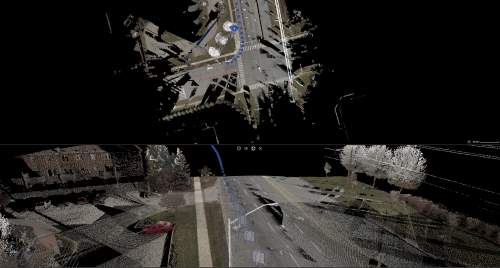
- The rendering quality of Vector Symbols has been improved.
- A View Action Menu now allows “Photo Navigation by Sequence” and “Rotate In Photo Group” actions to be applied to all views at once, with a shift click.
- When no spherical camera is available, Planar Positions for a Street-level Run are now also visible above scale 1/500 (2D) or a distance of 500m (3D).
- When a Photo Group is available: we create a Virtual Spherical for each group on the fly and show this.
- When no Photo Group is availale: we show all the Planar photo positions.
- All Planar photo positions are now presented using a square symbol by default.
Display, Inspect, and Extract Features
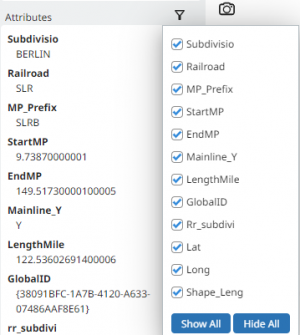
- There is now an attribute filter for the Inspector sidebar. This can be manually adjusted to see only the most relevant of attributes within large and complex datasets.
- Both the Measure and Annotation Sidebars now make use of an autocomplete component.
These field include:- Measure sidebar > Saved Measurement Code
- Measure sidebar > Saved Measurement Comment
- Annotation sidebar > Annotation Text Text
- Annotation sidebar > Annotation Tag Text
- Vector data with OSL data will now read the Symbol Library upon resource Open.
- A “Reset Legend” button is available to clear Legend manipulations.
- Fixed an Issue where newly create Dynamic Resource Groups would not properly zoom to the resource extent.
- The envelope of the Children within a Dynamic Resource Group will now be displayed, even if the Child resource isn't loaded.
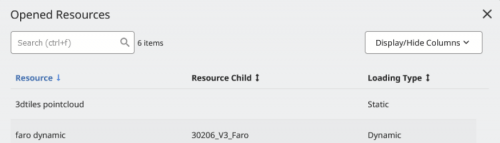
- The Open Resource Popup now shows all Dynamic and Static Resource Group Data, as well as Individual Resources.
Additionally, another column has been added to identify the Loading Type of Resource Data.
Import and Improve Data Interoperability
- A new “Photo” Mode is now available within Mapping Runs. This allows for referential Photo data to be opened from the Viewer.
- The viewer can now support Client side paging for WFS Version 2.0.
- The backend CRS expectations have been updated for WFS, which allow for better on-the-fly rendering when changing the Viewer CRS.
- WFS now have a fixed tile size of 100x100m.
Improve Open Best Photo
- There is a new option in Navigation Settings to prevent Ground Surface Intersections.
Maintenance
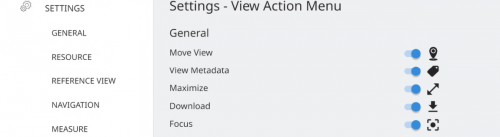
- The Viewer Settings and Resource Browser popups now have been slightly adjusted. Changes include:
- Remove the blue background title bar.
- Attached the sidebar directly to the left of the popups menu.
- The verbiage between the View Action Settings Menu View Action Menu is more consistent. Additionally, the View Action Menu Setting show the respective Icons associated with each View Action.
- The second download option for GeoJSON download is removed when the Measurement CRS is set to the default (EPSG 4326).
- The Viewer Catalog will now save the filtering of Table Columns within the user's browser's local storage.
- Resource Groups with OMI or OTM child resources can now be configured as a basemap.
- The View Action Menu Rotate in photo group no longer appears if the photo group attribute is absent.
- The help menu Quick Navigation guide has an updated link to the View Navigation Link and Keystrokes page.
Bug fixes
- Fixed a bug that sometimes-caused Oblique Views to Shake after a View Synchronization.
- Fixed a bug that prevented users from opening their Bookmarks in their Publications.
- Fixed a bug that made Oblique photos start on Spherical view when providing startup coordinates or URL arguments.
- Fixed a bug where Planar photo positions were no longer appearing in the 3D view.
3DM Viewer SDK
The 3DM Viewer SDK includes all 3DM Viewer improvements.
Display and Navigate Photo Positions
- A new startup option “STARTUP_ADD_MAPOBJECT_CAMERA_PROPERTIES” can be set to add extra named properties that define the pan and tilt of the camera.
Import and Improve Data Interoperability
- Fixed a bug where an existing WebGL context unexpectedly crash after adding a new View.
Improve UX and Performance
- A 3D View is prevented from opening if the setFocusPosition is called and no other views are yet present in the workspace.
- The Viewer SDK defaults to more generic loading messages. If the debug flag is set to true, the detailed messages will still show the extra detail.
Setups, Build, and Release Pipeline
- Fix an issue where the QGIS plugin would not load more required software to use the plugin.
Maintenance
- Host Objects now properly display on Photo views if selected as overlay.
- Fixed a bug in the QGIS plugin where the geometry of line data was not being updated on edit.