Table of Contents
What's New for 24.00.02
3DM Manage and Extract
Improve Upload of Reality Data
- An updated message “No Response from iTwin reality Management” message and open logfile button will popup if there is a connection issue when using Reality Management.
- The Reality Management Sidebar has been simplified. Changes include:
- Sorting of Reality Management Projects are Alphabetical
- Selection list is filterable from Local Resource Origin > Single Reality Data or Reality Data Collection (Like iTwin)
- Drag & drop works without choosing type
- Resource type will auto populate after using Drag & drop
- If Drag-and-drop has more than type, but same extension, the selection list is filterable by both type and extension (IE Web Ready 3D Scalable Mesh (JSON) and Web Ready Terrain Scalable Mesh (JSON)).
- If a File Selection type is chosen before searching for a Resource, the Selected File Type as Default in the File of Type (Not All Accepted Files)
- The “Unstructured” Data type option is added into Reality Data Collection
- The Mapping Run name is populated in Resource Details if uploading from Reality Management > Unstructured Data.
- A new main toolbar “Upload” is available to separate the 3DM Cloud and Reality Management Upload. To get the new toolsbar, update the program>services> ext_cloud3dm and/or ext_cc_insight extenstions's ini to “type upload”.
Increase ease of use to load resources
- TIF resources can be opened by the default Drag & Drop by, but a popup window will now appear suggesting to Optimize the resource.
- Information within the Create Mapping Resource has been shifted to better fit inside the panel.
New Features and Enhancements
- A “Show Legend Display” option is available for classified point cloud datasets within the dataset window. This provides a color context for each class within the dataset.
- Classified point clouds that also have unclassified data can be better visually displayed within the Legend Editor > Background Color options.
- The Drag & drop option is now available with individual resources with Reality Management > Single Reality Data.
- The Create Grid Tool has been enhanced by the following:
- 3D Boxes can be made
- Levels can be assigned to the Z values
- Split DataSets can work with 3D Boxes.
- The 3D Point Cloud Selection now has the “Invert Selection” available within the Point Cloud Selection Sidebar settings.
- The speed when making Depth Images has been greatly improved.
Improve & maintain data interoperability
- The option to remove CRS from Point Cloud Header at Import is available from the Convert Sidebar. Additionally, this can be configured in Mapping Import Templates.
- There are now up to 100,000 rows available in Reality Management Tab.
Create and Verify Asset Objects Using Reality Data
- The Analysis Engine has been redeveloped to the AI Detection and now has the structure of Project-Based extensions.
- The AI Detection Ortho Detectors has the capability to use the formats OMI, PNG, JPG and ECW with 2D Segmentations.
- All Rejected Objects in Verify Asset Resources can be batch deleted within the Resource Catalog > Generate Data > Delete Rejected Resources.
- Upon user discretion, Project Based extensions with OPC files per object can be imported into Asset Resources.
- AI Detection Results can now be converted to an Asset Resource. The workflow can be triggered via context-menu of the DataSetList. You can achieve the two Asset Resource Results:
- Resource with 3D Box DataSet + classified Point Cloud
- Resource with 3D Box DataSet + unclassified Point Cloud + selection files per class
- The Analysis Engine can better interpret Inverted CRS and compound CRS.
Initiate AI Training
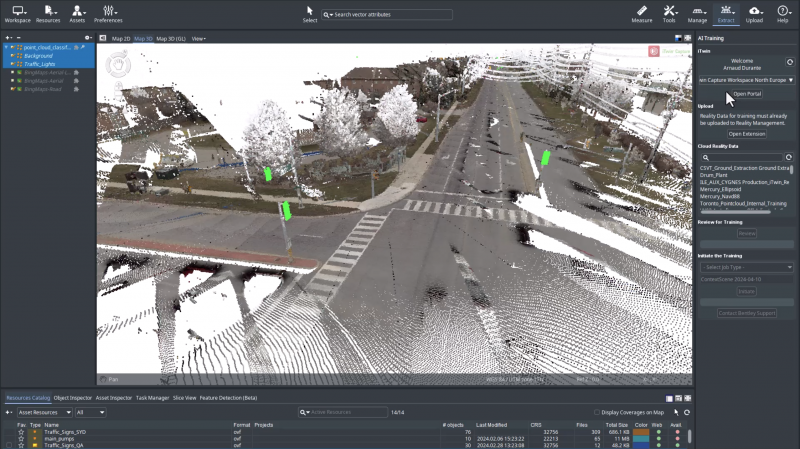
- A new sidebar AI Training has been made. The sidebar has a workflow that allow you to prepare the necessary data to create and AI Detector.
- In the AI Training Sidebar, a tooltip will provide context when selecting iTwins.
Usabilities
- Extensions and Tools have an Info button, which will link to the relevant Knowledge Base documentation.
- Project Based extensions now have the dated label prepopulated upon creation.
- The Stop and Cancel function response are improved with Semi-Automated Detection.
- To better transfer to another workflow, the “Image Annotation to Objects” Sidebar now has a button to “Cluster Objects” towards the end of the workflow.
- The preset AI Detector download page can be changed via the service > property.ini DOWNLOAD_DETECTOR_PAGE=<URL>
Layout
- AI Training and AI Detection have been moved and brought to the highest level within the Extract Toolbar List.
Tag
- The Export option in the Dataset List options has been renamed to Convert and Export.
- The Rail detector has updated the words from “Track” to “Rails” within the Tooltips and details.
Bug Fixes
- The Import and Upload Tool now can import all mapping content types.
- Fixed a bug where the Rail Detector would not work with Linear Reference Systems.
- Fixed a bug where the AI Detector results would show failed when the Detector was still running.
- Fixed a bug where a Mesh could not be added to the resource catalog if the .Json file was Drag & Drop into the Dataset list.
- Fixed a bug where Generate Data > Image Annotations to ContextScene add the Label/Element even when annotations do not have a tag/name/labelid.
- Fixed a bug when converting ESRI SLPKs.
Other fixes
3DM Cloud

The 3DM Cloud includes the 3DM core and 3DM Viewer improvements.
New Features & Enhancements
- Added support for video files hosted on Oceaneering Media Vault. Contact support for more information.
Usabilities
- Reality Data will now show the datacenter location.
- A No Restriction option is now available in Publications > Share. Keeping the guest list empty to allow any Bentley IMS users to open a guest session.
Layout
- Reality Data resources have additional data in the in the Specs & Tags > Owner section like 3DM Cloud Resources.
Tag
- Resource Specs and Tags “Updated By” has been changed to “Modified By”.
- Indivual Resources are now called 3DM Cloud Resources.
- The ContextShare name is retiring and names are being updated to the Reality Management verbiage.
- ContextShare Projects are now iTwin Projects.
- ContextShare Resources are now Reality Data.
- Previous ContextShare branding should now have the Reality Management equivalents.
Bug Fixes
- Fixed a bug where Company Reality Data resources were incorrectly displayed.
- Fixed a bug in the “View Users” page where users in Teams and Organisations were not listed.
- Fixed a bug that made the Measure and Inspector settings available even when disabled from the Publication Specs & Tags.
- Fixed a bug that prevented users from viewing Reality Data though Bentley IMS.
3DM Publisher
The 3DM Publisher includes the 3DM core and 3DM Viewer improvements.
New Features and Enhancements
- User brandings can make additional language adjustments to their build via user branding file.
- WFS now have GeoJson output support.
Layout
Tag
- The Resource Type “Point Cloud (3dtiles)” has been added.
Usabilities
- The Console Maximum Age Password Policy no longer can be set to zero.
Bug fixes
- Fixed a bug where the Publication list could sometimes have an unexpected error on loading.
- Fixed a bug where ODB resources were incorrectly swapping the Axis when using the EPSG:4326.
- Fixed a bug where a Resource Description would disappear upon a Create in the Publisher console.
3DM Viewer
The 3DM Viewer includes all 3DM Core improvements.
New Features and Enhancements
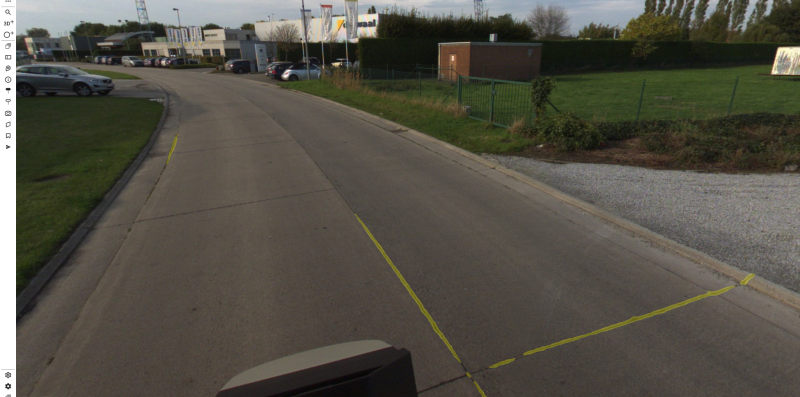
- There is now support to view Image Segmentations within the Viewer. Additionally, we have adjustable Image Segmentation settings within the Image View Settings.
- A new Photo Sort option Direction Offset + Spatial Distance is now implemented. This is now the default sort method UAV Planar, Streetlevel Planar and Streetlevel Panoramas.
- The Inspector Select now has a function to choose single resources and is available in a dropdown menu.
- The Image Play-through now has a loop option.
- If Resources have labels, there now is a text visibility option within the legend panel.
- The rendering radius of labels has been streamlined to 100 meter radius in Street Level Panorama and Planar as well as Aerial and Oblique Planar.
- Image Play Through will now always wait until the photo has been loaded at the requested quality level.
- Image Play Through has extra speed options : load one photo per .01 seconds, 3 seconds, and 5 Seconds.
- Aerial Spherical Runs will now show the 50 closest photos to the user, instead of all photo's within 50m.
- The viewer now supports attributes that contain a URL upon selection. Preparation must be done in Manage and Extract prior.
Usabilities
- Viewer Keystrokes and Shortcuts have been added and documented in the Knowledge Base.
- Extra context is provided in the Bookmarks “Include Settings” Tooltip.
Layout
- The View Action Menu settings have been now separated to General and Specific View Types.
Tag
- A 3DTiles Pointcloud resource opened via local drag & drop now has the proper Resource type of “Point Cloud (3dtiles)”.
Bug fixes
- Fixed the View About Panel incorrectly showing a debug version.
- Fixed an occasional error with the Image View > Line of Sight option.
- Fixed a bug that prevented OWFS to load when an OWFS had unexpected Whitespace
- Fixed a bug that that made OWFS not render correctly with generic geometry types.
- Fixed a bug where a photo would not be found when adding a photo from a dynamic resource group.
- Fixed a bug where the Copy to Feature button would not work with ODB Line Resources.
- Fixed a bug where the Stop function would stop the measure function instead of the active measurement.
- Fixed a bug where a linked W3SM resource from Reality Management would open up in the wrong location from the Cloud Viewer
- Fixed rendering of transparent data (transparent data was getting more white instead of transparent).
3DM Viewer SDK
The 3DM Viewer SDK includes all 3DM Viewer improvements.
New Features and Enhancements
- The QGIS, Experience Builder, and WebApp builder have been updated. The plugins will now automatically update the Host Map positions
- The snapshot service has been updated to have support for Planar and Oblique Imagery.
Layout
Bug Fixes
- When adding a MapObject with a symbolUrl configured to a png image, the url symbol will properly display
- Fixed a bug with the QGIS plugin with objects not being overlayed into the viewer
Other fixes
- Updated the QGIS plugin to autoamticall install WebSockets after the latest Windows Security Update.