Table of Contents
Orbit Desktop Installation
This page describes how to download, install, request a license, and activate an Orbit desktop product.
Orbit desktop products require Orbit License Acitavation to operate, see Orbit Online License Activation.
Server products are available on-demand only and require assistance by the Orbit support team to install, see Orbit Server Installation.
Register
Using your Orbit GT account you can download a desktop Product Installer and request an Activation Key.
If you do not have an Orbit GT account, register first :
http://www.orbitgt.com/register
Check your junk mail, the confirmation email might be blocked by your spam filter.
Download
Signed in users can download a standalone product from our website :
https://orbitgt.com
Install
Double click the downloaded executable to install :
- Do not overwrite an existing Orbit installation with a new or updated version.
- Administrator permissions are required to successfully complete installation.
Request Activation Key
Users signed in to the Orbit GT website can complete Activation Request.
A Trial is available with some restrictions. A Full license is granted upon purchase.
- Start Orbit
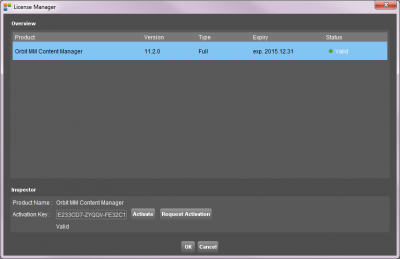
If you do not have a valid Activation Key, the License Manager window will pop-up.
Otherwise, open this window from the Main Toolbar “Help” menu. - License Manager Window
- Click the “Request Activation” button.
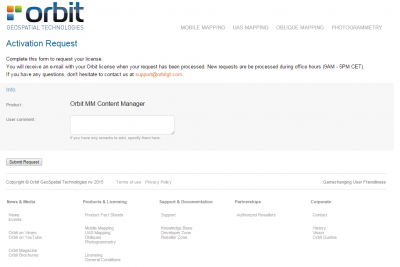
- You will be redirected to the Online Activation Request Confirmation page.
- Online Activation Request Confirmation (Login required)
- Optionally add a comment and submit your Activation Request.
- After submitting, you will receive an auto-reply Activation Request Confirmation email.
Check your junk mail if you didn't receive this confirmation.
- Activation Key Email
- After submitting, you will receive an auto-reply to confirm your Activation Request has been sent successfully.
Check your junk mail if you didn't receive this confirmation. - When your Activation Request is processed, you will receive an email containing the Activation Key.
Requests are processed during office hours (9AM - 5PM CET).
| License Manager Window | Online License Request page |
 |  |
Activate Product
Validate your product by entering the Activation Key.
- Start Orbit
If you do not have a valid Activation Key, the License Manager window will pop-up.
Otherwise, open this window from the Main Toolbar “Help” menu. - License Manager Window
- Copy-paste the Activation Key into the “Activation Key” entry field.
- Click the “Activate” button to validate the product. Online connectivity is required.
- Restart Orbit
More Information
The product reference documentation is available online, see Knowledge Base - Version 22.7.
Do not hesitate to contact orbit.support@bentley.com if you have any questions.