Table of Contents
Back to Dataset Legend Editor
Shadow
A shadow can be used for displaying a symbol or a label. Choose the Shadow Style between Drop Shadow or Perspective Shadow.
| Drop Shadow | Perspective Shadow |
|---|---|
 |  |
Drop Shadow

| Drop Shadow | ||
|---|---|---|
| Visibility | Tick to show shadow. | |
| Style | Choose drop shadow. | |
| Direction | Set the drop shadow direction. Press RESET to set the direction to default value. |
|
| Distance | Set the visual distance between the label and his shadow and select a size unit | |
A small distance  | A large distance  |
|
| Color | Choose a color for the shadow. | |
| Transparency | Set the transparency percentage of the symbol from opaque to completely transparent. | |
| Blur | Set the blur or fading of the shadow, from no blur to maximal blur. See Shadow Blur. | |
Perspective Shadow

| Perspective Shadow | ||
|---|---|---|
| Visibility | Tick to show shadow. | |
| Style | Choose Perspective Shadow. | |
| Light Angle | Set the angle of light incidence. Press RESET to set the angle to default value. |
|
| Length | Set the length of the perspective shadow. | |
A smaller length  | A greater length 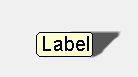 |
|
| Color | Choose a color for the shadow. | |
| Transparency | Set the transparency percentage of the symbol from opaque to completely transparent. | |
| Blur | Set the blur or fading of the shadow, from no blur to maximal blur. See Shadow Blur. | |
Blur
| Blur | |
|---|---|
| Blur = 0 , no fading: | Blur = 5 , maximal fading: |
 |  |