Table of Contents
Orbit Mobile Mapping Plugin for ArcGIS
The Orbit Mobile Mapping Publisher makes it possible to use Mobile Mapping content within ArcMap.
This page describes the use of the Orbit Mobile Mapping Plugin for ArcGIS. For all other use, management or requirements review : Orbit MM Publisher
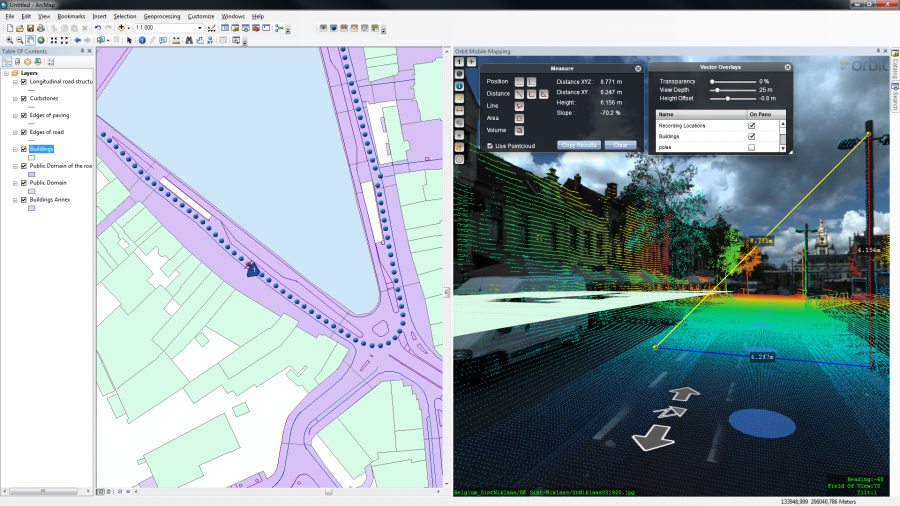
The Orbit Mobile Mapping component is fully integrated in ArcMap :
- To use the Map component we trust on your knowledge of ArcMap.
- To open an photo or to load the photo positions a georeferenced map frame is required. Load a reference base-map and zoom to the area of your interest.
Orbit Mobile Mapping Toolbar

The Orbit Mobile Mapping toolbar is displayed automatically after installation. It can be hidden/displayed via the ArcMap customize toolbar drop-down.
Buttons from left to right :
- Open photo
Open or update the first mobile mapping view. Activate this function and single click on the map frame to load the nearest photo.
The photo positions doesn't need to be visible for opening a photo. - Display photo positions
Display the photo positions on the map frame. The photo positions can only be made visible if the map scale >= 1/5,000. - Save measurement
Save the mobile mapping measurement done and visible within the Orbit panorama component as feature in an available ArcMap feature class according the spatial type. - Overlay vector data
Overlay an available ArcMap feature class on the mobile mapping views within the Orbit panorama component. - Settings
Establish and configure the connection to your Orbit Publisher and load a publication. - Help
Go for help. You will be redirect to this page.
Panorama Component
The Orbit Panorama component is a dockable ArcMap component.
Click and drag the title bar to move it anywhere you want or to attach it to one of the ArcMap dockable hot spots.
The documentation on how to use the Orbit Panorama component can be reviewed here : Panorama Component.
Getting Started
Installation
- Review the technical requirements of this plugin : IT Requirements for Orbit Mobile Mapping Publishing Clients
- Download the plugin from our website : http://www.orbitgt.com/content/mm-arcgis-desktop-plugin#downloads.
Activation
To use the plugin, an activation key is required.
- If no valid activation key is available the activation window will pop-up automatically when using the plugin.
- The activation key needs to be entered only once as it will be cached on your device.
- The activation code will be checked online, it is imperative that the PC is online to use the plugin.
- To obtain an activation key contact sales at orbitgt dot com.
Connect to Publisher
Use the “Settings” button (5th icon of the Orbit Mobile Mapping Toolbar, see above) to establish a connection to an Orbit Publisher. Once successful load one of the available Publication.
Demonstrator resources
If you would like to evaluate the plugin you can use our demo Publisher.
- Server connection settings :
- URL : http://demo.orbitgt.com/service
- Username / password : demo
- Choose your publication
- Map frame reference / Find data :
- Check the Web Demonstrator to find the proper locations.
- Or use the demo_locations_be_gent resource in combination with the “BE Gent” publication and you are all set (location & Map CRS).
Movies
Check out our YouTube channel.