Table of Contents
Browser based Obliques Viewer
The Orbit Obliques Publisher makes it possible to publish Oblique content within a browser over the internet or in a local network.
This page describes only the use of an Orbit publication within a browser.
For all other use, management or requirements review : Orbit Obliques Publisher
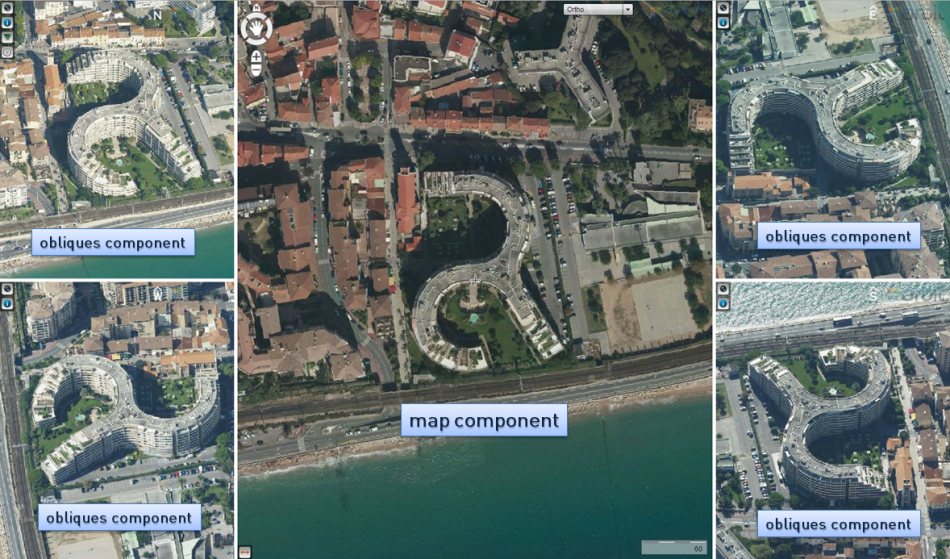
Components
| Map component | |
|---|---|
| Map Component | Change basemaps, navigation on the map and show oblique images by searching by geocoding, XY or objects on the map. |
| Navigation on oblique images | Navigate on the oblique images and open a new image by searching or by panning. |
| Measure on map | Measure a point, distance, angle or area on the map. |
| Obliques component | |
|---|---|
| Obliques Component | Generic overview of the functions of the obliques component. |
| Navigation on oblique images | Navigate on the oblique images and show new image(s) by searching or by panning. |
| Toolbar | All info on the toolbar of the obliques component and its functions. |
Open a Publication
A Publication can be opened via a direct url or embedded, as a part of a webpage. A url is case sensitive. Pay attention to perfect spelling.
Depending the configuration of your server the direct publication url will look like :
http://<server name>:<port>/publications/<publication name>/<page>.html
A default Orbit configuration provides 3 html pages (/<page>.html) to open your publication :
- \index.html : The publication will be opened with a Map and Panorama component
- \obliques.html : Only the Oblique component will be opened
- \map.html : Only the Map component will be opened.
A publication is loaded with a default start-up location and map scale. These are defined by the administrator.
Contact your service provider to know more about your publications and their direct url's.
Open Obliques at XY
Open the publication on a specific position defined by XY coordinates :
http://<server name>:<port>/publications/<publication name>/obliques.html?x=<X-coordinate>&y=<Y-coordinate>&crs=<EPSG code>
- <X-coordinate> : value for X with . as decimal separator.
- <Y-coordinate> : value for Y with . as decimal separator.
- <EPSG code> : optional crs EPSG code of the given x,y coordinates. If no crs is set the publication crs will be used.