Consolidation
This page describes the desktop extension “Consolidation” for Mobile Mapping.
 Main Toolbar > Manage > Consolidation.
Concepts
The Consolidation of an “Original Mapping resources” generates a new “Consolidated Mapping resources” for which all predefined adjustments and corrections of the Original Mapping resources are effectively applied :
-
- Positional correction of Segments by Ground Control Points.
- Remove Segments.
At consolidation the Mapping resources Trajectory might be adjusted or Segments of the Mapping resources Trajectory can be removed. Consequently the Mapping resources Trajectory accuracy indication at time of recording is no longer applicable for the Consolidated Mapping resources. Therefore the Trajectory Graph will be empty.
Sidebar
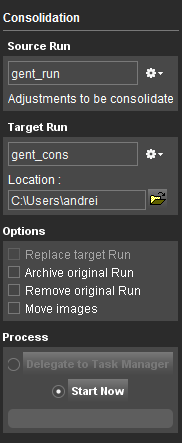
Source Mapping resources
Select the Original Mapping resources to be consolidated.
Target Mapping resources
Set the Name and Location for the Consolidated Mapping resources or overwrite a previous consolidation of the Original Mapping resources.
Options
Available options for consolidation :
- Replace Consolidated Mapping resources:
- Archive Original Mapping resources in Catalog, see Catalog.
- Remove Original Mapping resources from Orbit, actual Mapping resources files are not deleted, see Manage Mapping Resources.
- Move images instead of copy images from Original Mapping resources to Consolidated Mapping resources to avoid data duplications.
Process
Delegate job to Task Manager or start processing now.