This is documentation of an archived release.
For documentation on the current version, please check Knowledge Base.
For documentation on the current version, please check Knowledge Base.

WPLIST FILES SETTINGS
Waypoint configuration settings to execute an Orbit UAS flight plan:
A flight plan that is generated through the ORBIT UAS flight software is saved as a “[underscore][underscore]WPLIST.TXT” file. To execute the flight, this file (script) is copied to the root of the micro SD-card. Each new script overwrites the previous and no other files may be copied to the card! The drone should be set to read a specific waypoint script.
Setup procedure using md_COCKPIT v 3.2.xx
- Power up the RC and the drone
- Connect the drone with a computer through the programming cable. The white dot on the serial plug should face to the front of the drone.
- Start md-Cockpit
- Open in md-Cockpit the “Drone configuration - COM xx <FC>” tool
- You see an empty “Online drone configuration”window

- Read the drone settings by left clicking the button with the blue arrow pointing downwards

- Scroll to the “Waypoint configuration” and activate the field “Select the active waypoint file”
- Enter value “0” and confirm by tapping the tabulation key. In the selection field is displayed: “0, [underscore][underscore]WPLIST.TXT”

- Save the customized settings to the drone by left clicking “Write the settings back to the drone” (= the button with the red arrow pointing upwards)
- Disconnect the program cable and switch off the drone + RC
Remark
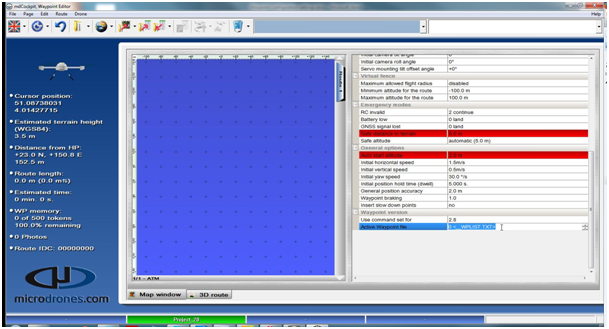
- The flight script files that are generated through the waypoint editor should now also be saved as “[underscore][underscore]WPLIST.TXT” file! To perform this, set in the “Waypoint - Porperties for the route” window the “Active Waypoint file” to “0”
Last modified:: 2019/03/25 11:36