This is documentation of an archived release.
For documentation on the current version, please check Knowledge Base.
For documentation on the current version, please check Knowledge Base.
Back to View and Use Oblique data
Measure in Oblique Data
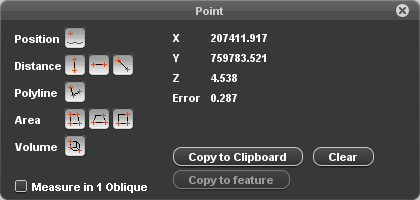
| Measurement based on 1 or 2 obliques | |
|---|---|
 | Depending on the availability of a DTM, one can measure in one oblique. If no DTM is available, two obliques need to be used for a measurement. Tick on/off depending on the DTM availability or preferred method. If measurement is done in more than one oblique, the error on the measurement will be given. If measurement is done in more than one oblique, it is advised to show the triangulation measure lines (preferences Oblique). |
| Position: measurement of a single position | |
 | A new click is a new measurement (X, Y and Z positions). |
| Distance: measurement of a straight line between 2 points. | |
 | Distance vertical measurement with first measuring on the ground (only available for measurements in 1 oblique). Distance horizontal measurement. Free distance measurement between two points. |
| Polyline: measurement of a polyline, between 2 or more points | |
 | Free polyline measurement (end by right click and 'stop measurement'). |
| Area: measurement of an area, defined by 3 or more points | |
 | Free area measurement. Horizontal rectangular area measurement defined by three points. Vertical rectangular area measurement defined by three points. |
| Volume: measurement of a squared Volume defined by 3 points | |
 | Squared volume measurement defined by 3 points. 1st and 2nd point define the first base line, 3th point defines height and the 2nd baseline. |
Copy to Feature
Last modified:: 2019/03/25 11:36