This is documentation of an archived release.
For documentation on the current version, please check Knowledge Base.
For documentation on the current version, please check Knowledge Base.
Back to Orbit GPS Photography
GPS Photography - Import Photos
The GPS Photography procedure “Import photos” allows the Orbit user to import new GPS photos.
Procedure
- Launch the procedure “Import photos”.

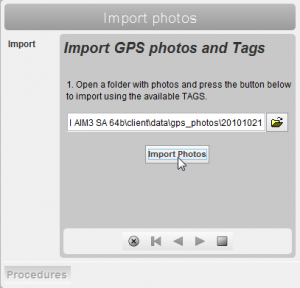
- Import : import GPS photos
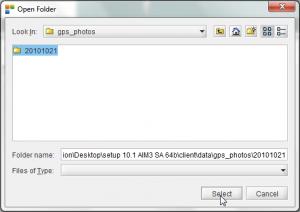
- Browse to the folder where your GPS photos are located.
If photos include a TAG, they will automatically be assigned to the according type
 Select the according folder
- Click the 'Import Photos' button
Depending on the image size and the number of photos this might take a couple of minutes.
- A popup window automatically opens when the import of gps photos has completed. It also shows some information about the import:
- the number of succesfully imported photos
- the number of photos in the folder that were imported previously
- the number of imported photos that didn't include a TAG. These are automatically assigned to the 'Default' type.

- Finish the procedure by clicking the square button.
Next action
In the GPS Photography tab it is possible to select, view, edit and inventory imported photos.
Last modified:: 2019/03/25 11:36